
Meetings, walks, thinking out loud. Nothing to write down, nothing lost.
Just record,and the day stays as text.
Transcripts and minutes on this iPhone, free. The next day, ask Siri for “the to-do list I worked out on yesterday’s morning walk” (Siri AI in iOS 27).

What this iPhone can do on its own is free. By default, neither the audio nor the transcript leaves this iPhone. There is no account.
“Show me the photos from yesterday’s morning walk and the to-do list I worked out on the walk”
Here are the photos from your morning walk yesterday. I also found your "Morning walk" audio notes where you talked through your plans for the day.
Siri AI’s answer, observed on a device · iPhone 17e, iOS 27.2 beta, English · the photos are from the iPhone’s Photos app, the record from Koedori’s demo day
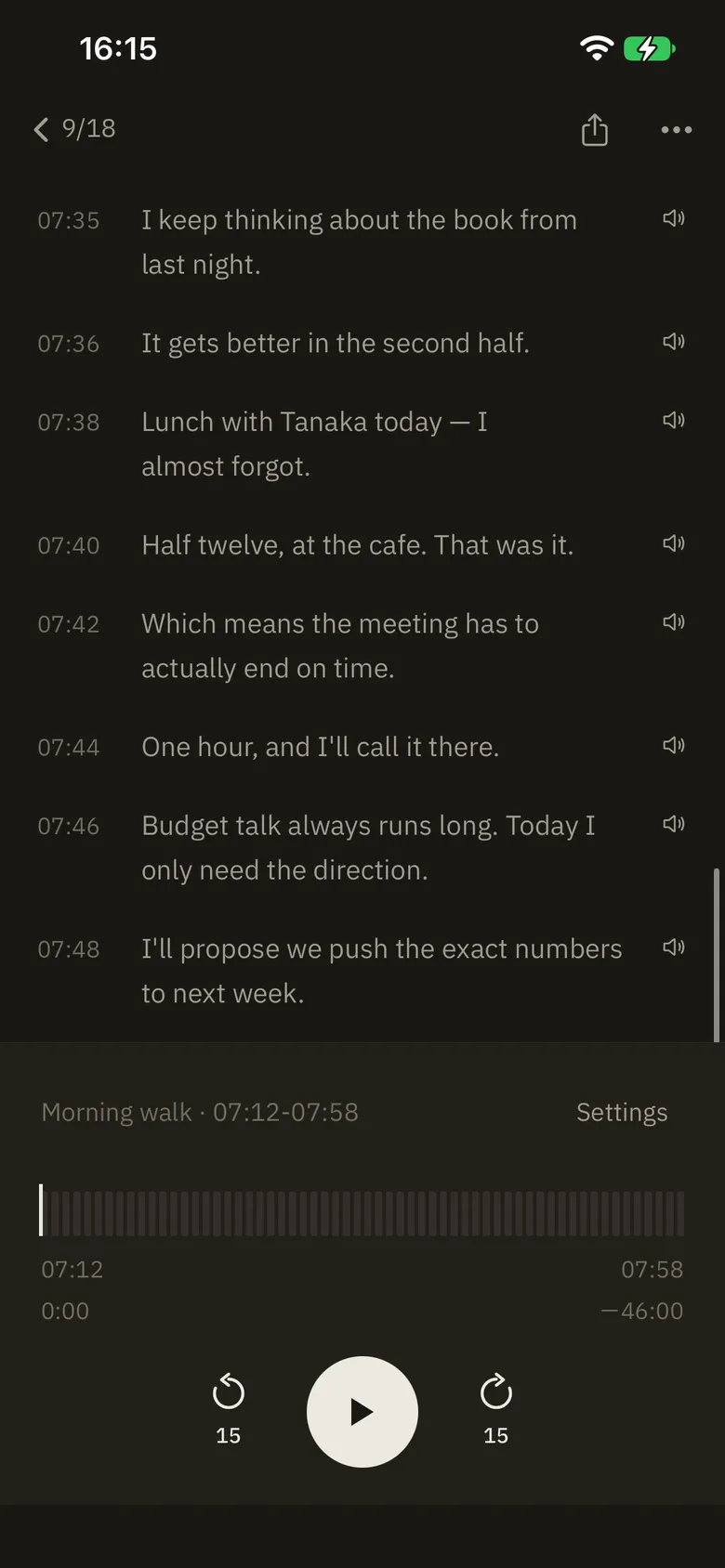
07:46 Budget talk always runs long. Today I only need the direction.What sets it apart
- 1
It records all day, left on
Before and after the meeting, the walk, the thinking out loud. Forget to press record and the day is still there.
- 2
Transcripts and minutes, on this iPhone
Nothing is sent by default. No account. On an iPhone with Apple Intelligence the minutes are written on the device.
- 3
Free, minutes included
Recording, transcripts, search, minutes, Siri. You pay only if you choose Koedori Plus for the cloud.
What Koedori gives you
-
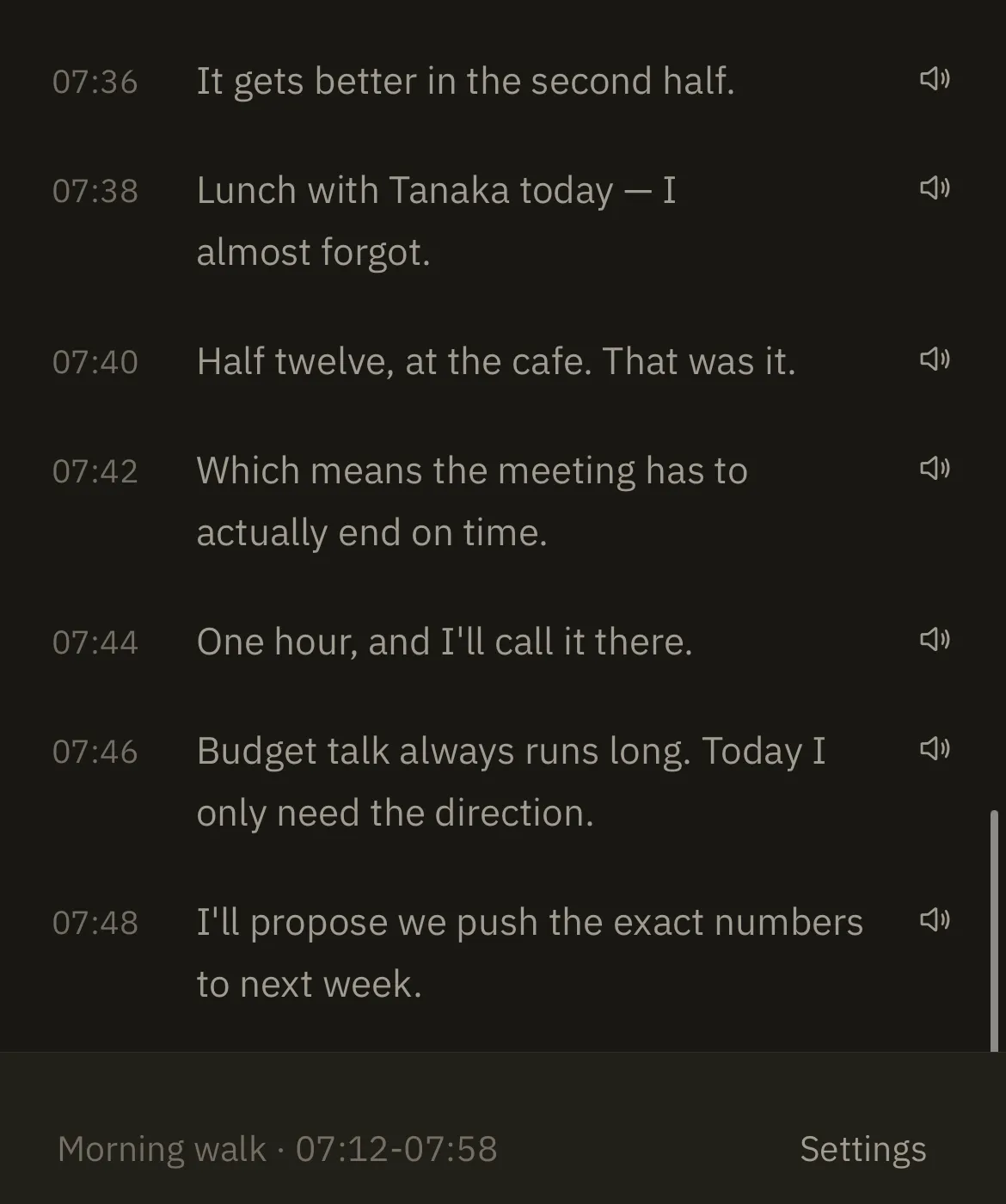
The day, as text, with the time it was said
Leave recording on. What you said lines up at the time you said it. Transcription happens on this iPhone.
-
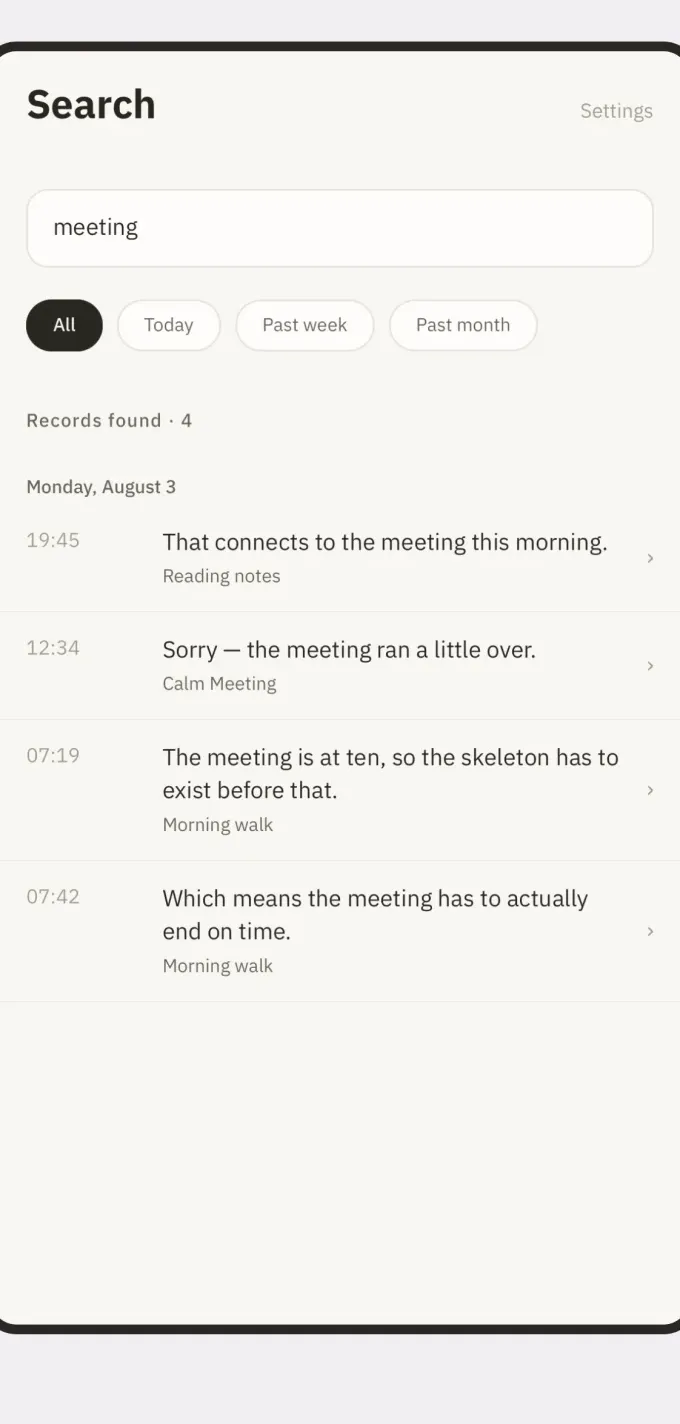
One word finds it, and it plays from that second
Type “meeting” and the day comes back. Tap a line and the audio starts where that sentence was spoken.
-
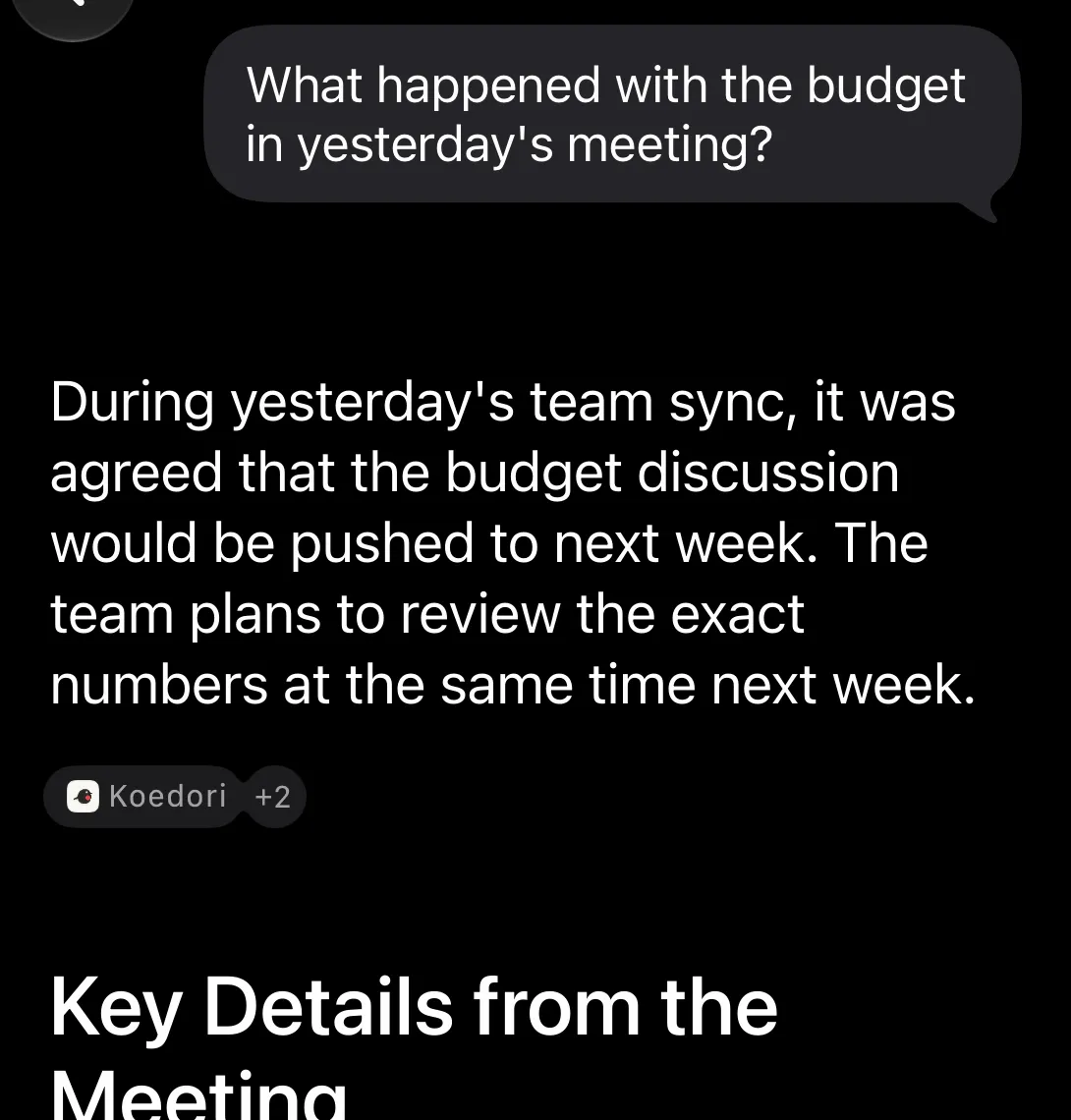
The next day, just ask Siri
No date, no app name. You get the answer and the line it came from. Siri AI in iOS 27 (beta).
Only the cloud features are Koedori Plus, an optional subscription.
One day
This is what August 3rd looked like.
None of these six were typed. They were said on a walk, in a meeting room, on the way out of a shop, and once before bed.
The hours nobody spoke stay empty. Koedori does not write prose to fill them. Titles and summaries are pulled out of what was actually said — nothing more.
Monday, August 3
-
07:12
Morning walk Memo
A loop around the park. Talked through what today needs.
07:46 Budget talk always runs long. Today I only need the direction.
2h 2m without speech
-
10:00
Team sync · budget pushed to next week Meeting
Direction agreed. The exact numbers wait for the third quote.
1h 32m without speech
-
12:34
Calm Meeting Memo
Catching up. Going to finally read the book they recommended.
2h 18m without speech
-
15:40
Design question Meeting
Settled how to split it. Try small first and watch.
1h 50m without speech
-
18:05
Evening groceries Memo
Rice and detergent. Picked up breakfast while I was there.
1h 9m without speech
-
19:40
Reading notes Memo
Things worth keeping from tonight's chapter.
-
22:29
Recording
Koedori and Siri AI
Record today. Tomorrow, just ask.
No date, no app name. You get the answer and the line it came from.
-
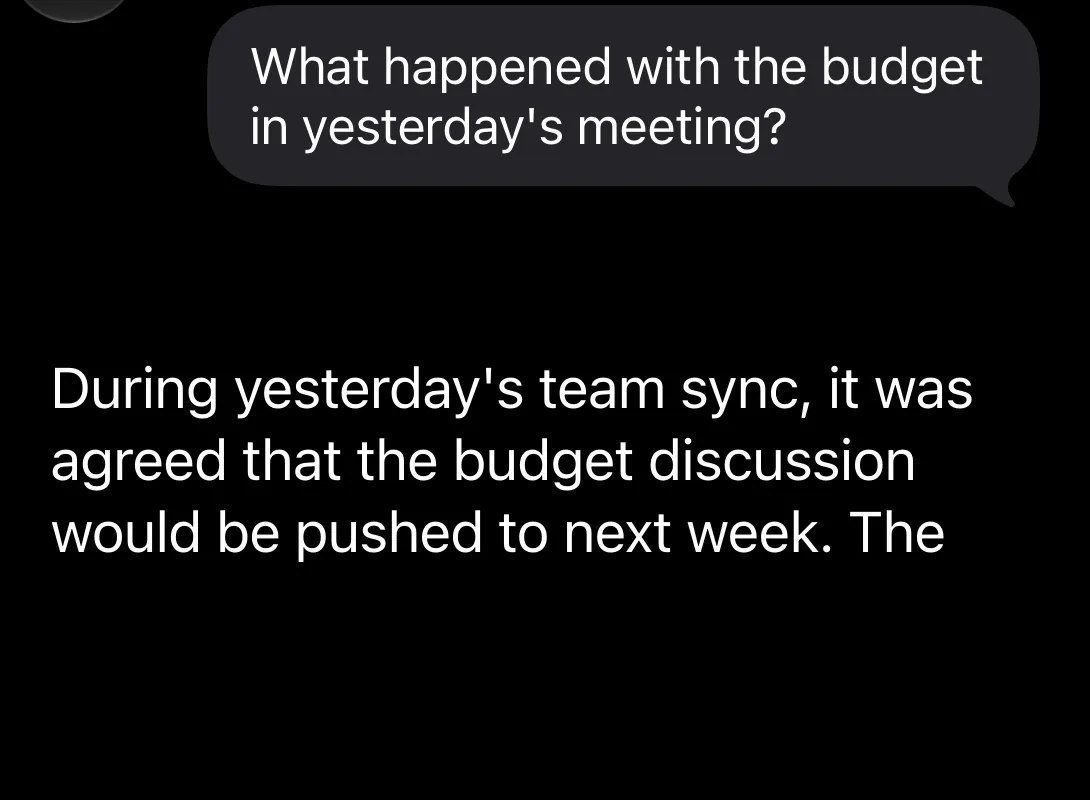
Ask
“What happened with the budget in yesterday’s meeting?”
-
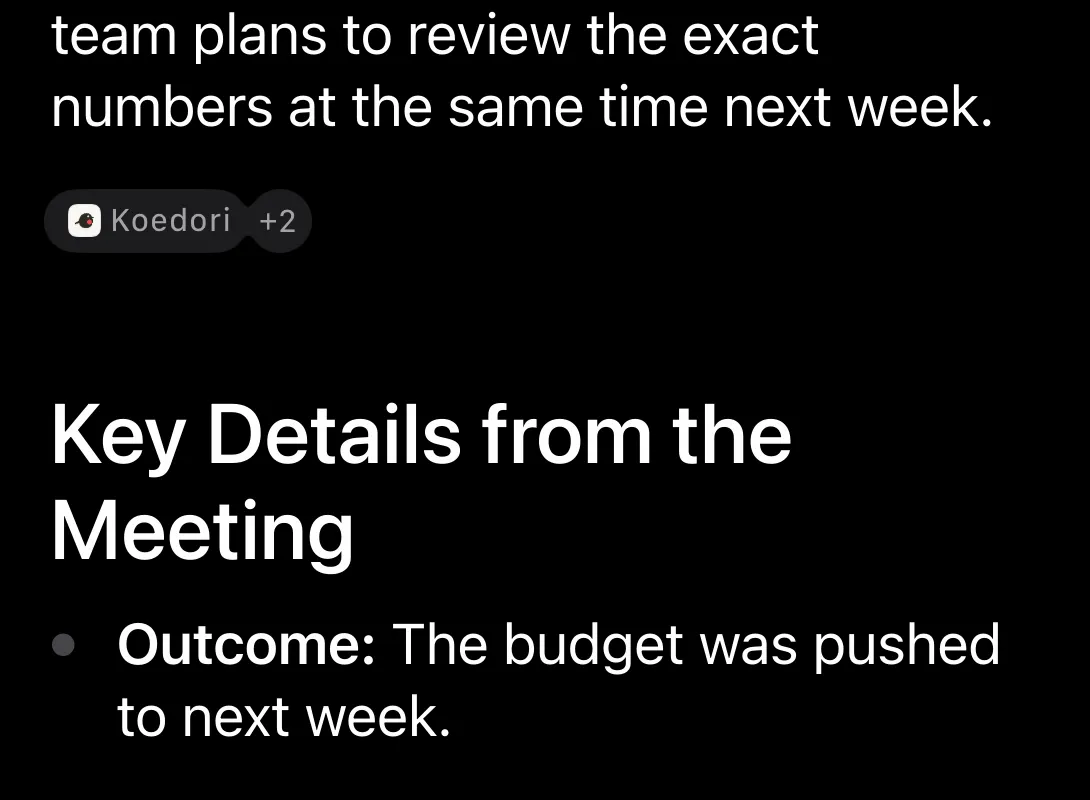
Answer and source
During yesterday’s team sync, it was agreed that the budget discussion would be pushed to next week. The team plans to review the exact numbers at the same time next week.
-
Straight to the line
Tap the source and Koedori opens the record at that line.
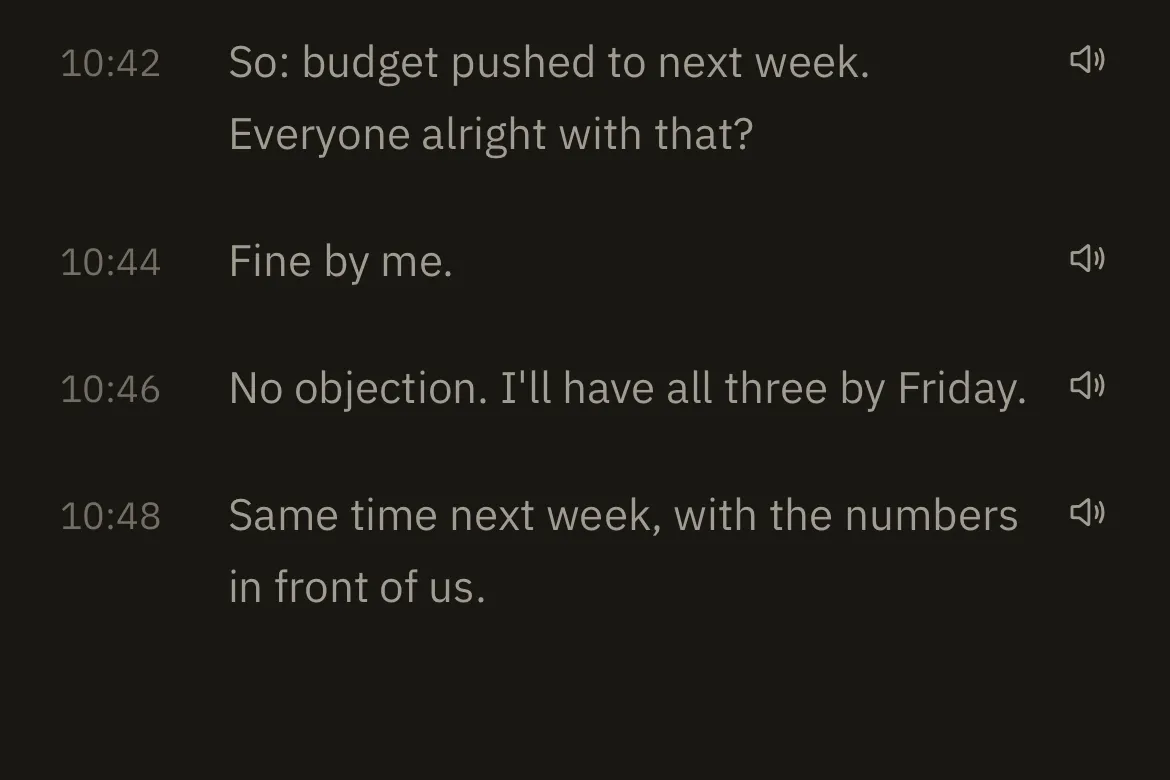
Device captures · iPhone 17e, iOS 27.2 beta, Siri in English. Answers are shown as observed, not summarized.
Other questions verified on the device, in Japanese or English
- What did I say I’d buy on yesterday’s shopping run?
- What happened with the budget in the meeting on August 3?
- Siri AI is an Apple beta.
- iPhone 15 Pro or later, iPhone 16 or later, or iPhone Air, on iOS 27 or later.
- The phone and Siri must be set to the same supported language, in a region Apple supports.
- Off by default. You turn it on in Koedori’s settings.
- Only the titles, dates and transcripts of saved records go to Siri. Never the audio.
- Your question and the record text it draws on may be processed in Apple’s cloud. Nothing goes to Koedori’s servers.
- The photos come from the iPhone’s Photos app. Koedori never touches them.
- Koedori builds the index in order, so a record saved a moment ago may not be found right away.
- It is free. Koedori Plus is not needed.
This is not a way to start or stop a recording by voice. Some phrasings will not find a record.
Find it later, by word
Type “meeting” and the day comes back.
One word against the day above. Tap a timestamp and the audio starts at the second the sentence was spoken.
What got kept is that the thought at 19:45 and the plan at 07:19 were the same conversation.
Records found · 4
Monday, August 3
-
19:45
That connects to the meeting this morning.
Reading notes
-
12:34
Sorry — the meeting ran a little over.
Calm Meeting
-
07:19
The meeting is at ten, so the skeleton has to exist before that.
Morning walk
-
07:42
Which means the meeting has to actually end on time.
Morning walk
Stays on the phone
By default, nothing is sent.
Instead of calling it safe, here is the structure. By default Koedori runs entirely on your device, without an account. Something reaches the cloud only when you request a Koedori Plus action on one recording, turn on encrypted audio backup yourself, or turn Siri on in Koedori’s settings and ask Siri (Apple may process that in Apple’s cloud, never via Koedori’s servers). Both what it cannot do and what it can follow from that.
So it cannot
- Sync across devices — the same records on an iPhone and an iPad is not possible.
- Offer a web version you can open in a desktop browser.
- Share a record with someone else for editing, or hand out a link.
- Move your library any way other than an encrypted iPhone backup when you change phones.
In exchange
- There is nothing to register, so there is no email address and no password to hold.
- By default nothing is transmitted. A Plus processing action sends only the recording you tapped; cloud backup uploads device-encrypted audio automatically only after you turn that destination on.
- Your voice and transcripts are not used to train AI. A recording selected in Plus is sent to outside AI services only to perform the processing you requested, and only to providers whose terms rule out training on the data they receive.
- Recording keeps working in airplane mode and with no signal; so does transcription, once the iPhone has fetched the speech model the first time.
- Any record exports as an m4a, any transcript copies in full, and all on-device data can be erased in Settings.
It is also why it is free
Features that finish inside this iPhone incur no cloud processing or storage cost. So recording, transcription, titles and summaries, search, the day player and minutes are free. Only cloud processing and storage are part of the optional Koedori Plus subscription.
Two ways to use it
For work, and for the rest.
Recording at work
Meetings, interviews, lectures. By default neither the audio nor the transcript leaves this iPhone, so material you cannot send anywhere is still recordable.
- Copy the full transcript as the first draft of your minutes.
- “Add divider here” splits the record into a new section on the spot.
- Minutes can be built on the device itself.
- When a meeting deserves one more pass, the Koedori Plus cloud features — re-polishing the transcript and cloud minutes — are there, per recording.
For the days you never write
Journals fail on the effort of starting a sentence, not on the time. Speaking one is over before the walk ends.
- One line — “today I did X” — or ten minutes on a walk is enough.
- The day player replays a whole day from morning to night in one piece.
- The same day a year ago answers to the same words.
What it cannot do
The limits, first.
Koedori only puts things on screen that it can actually do. For the same reason, here is what it cannot — before you install it.
- Automatic speaker identification is not supported
- The lines of a meeting appear in the order they were spoken. The app does not automatically identify speakers or separate the transcript by speaker.
- Transcription needs iPhone 12 or later
- On iPhone 11 and iPhone SE (2nd generation), recording, playback, the timeline and the day player work — transcription does not.
- AI titles and summaries need Apple Intelligence
- On devices without it, recording, transcription and search work as normal, and you can title records yourself.
- iPhone only
- There is no iPad app, no Android app and no web version. There is no cloud sync today either.
Inside the app
-
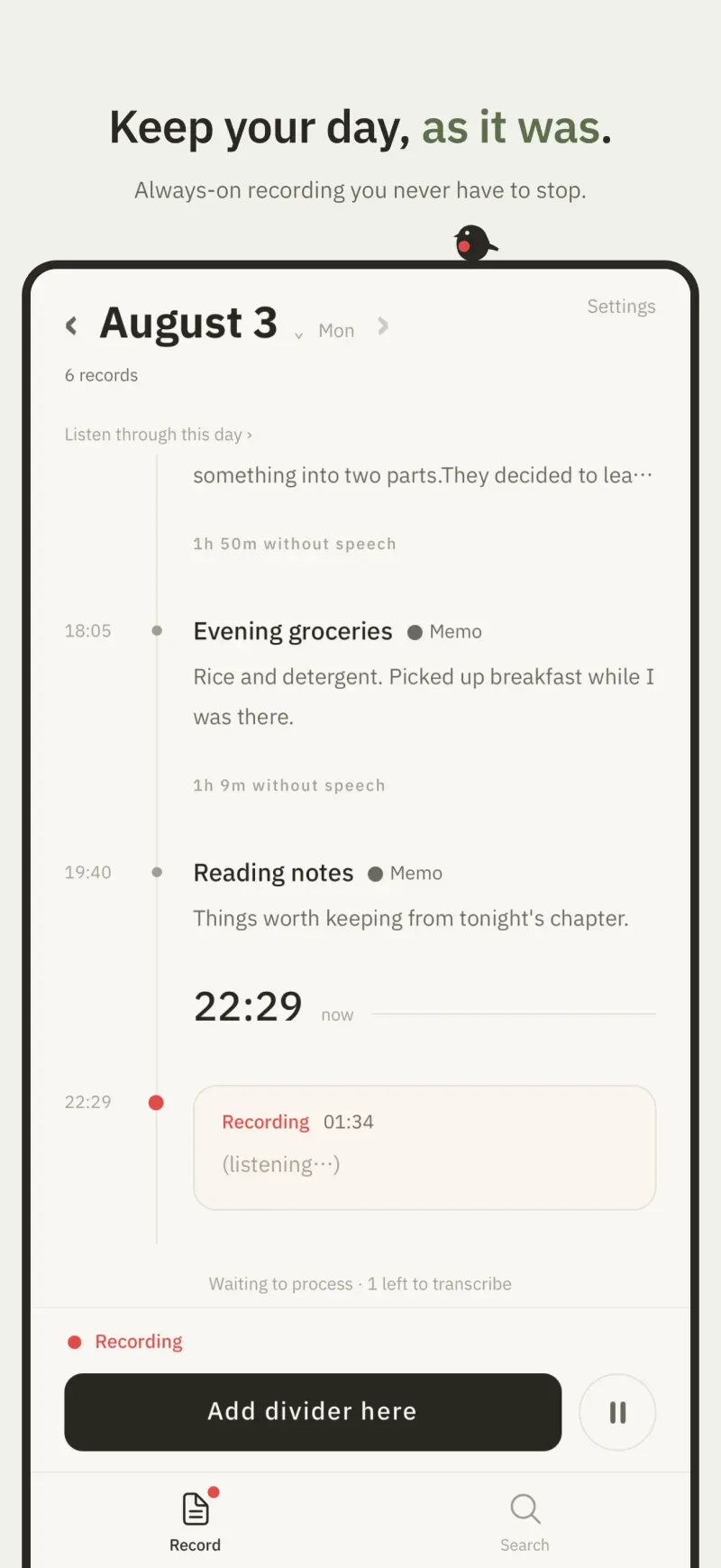
Leave recording on. What you say becomes text on the device, as you say it. -
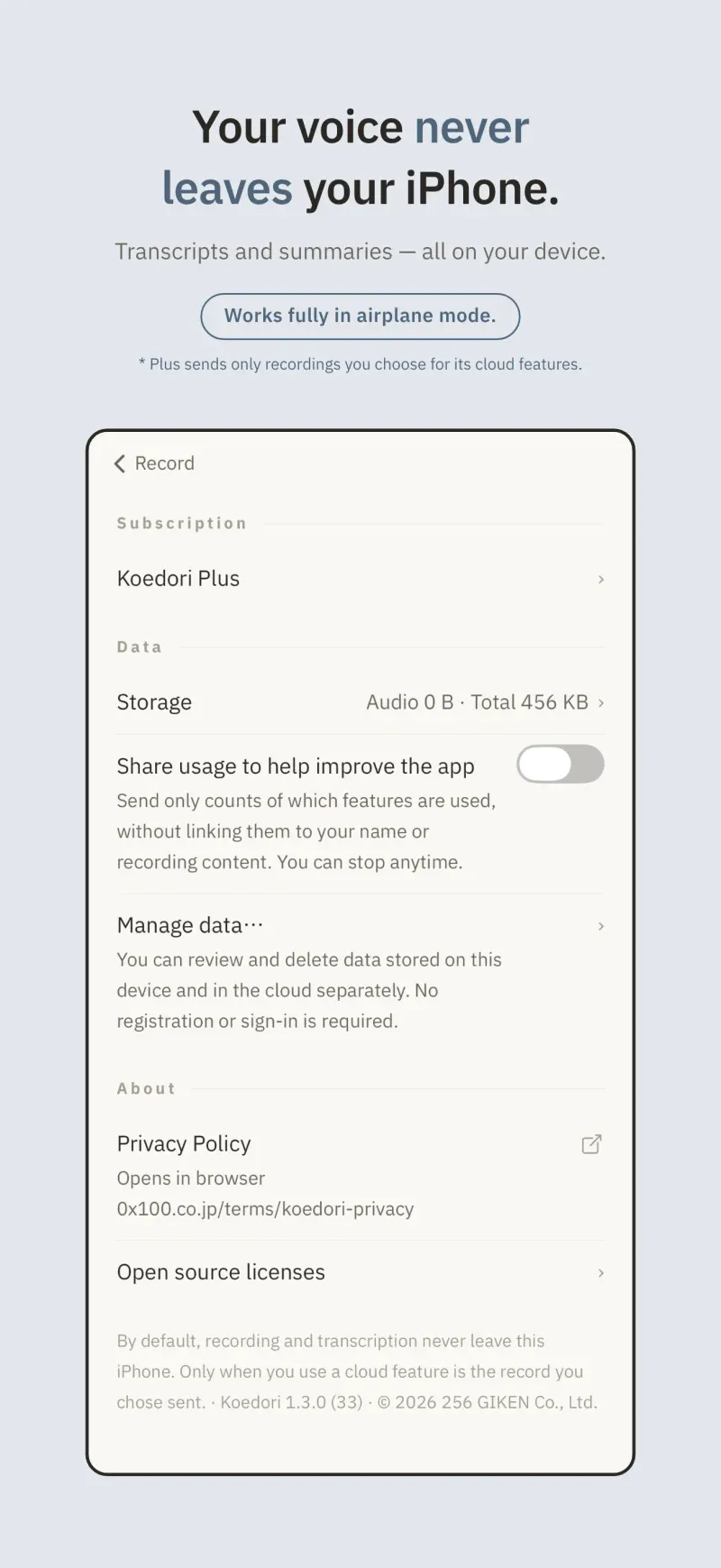
Recording and transcription are on-device. By default, nothing leaves this iPhone. -
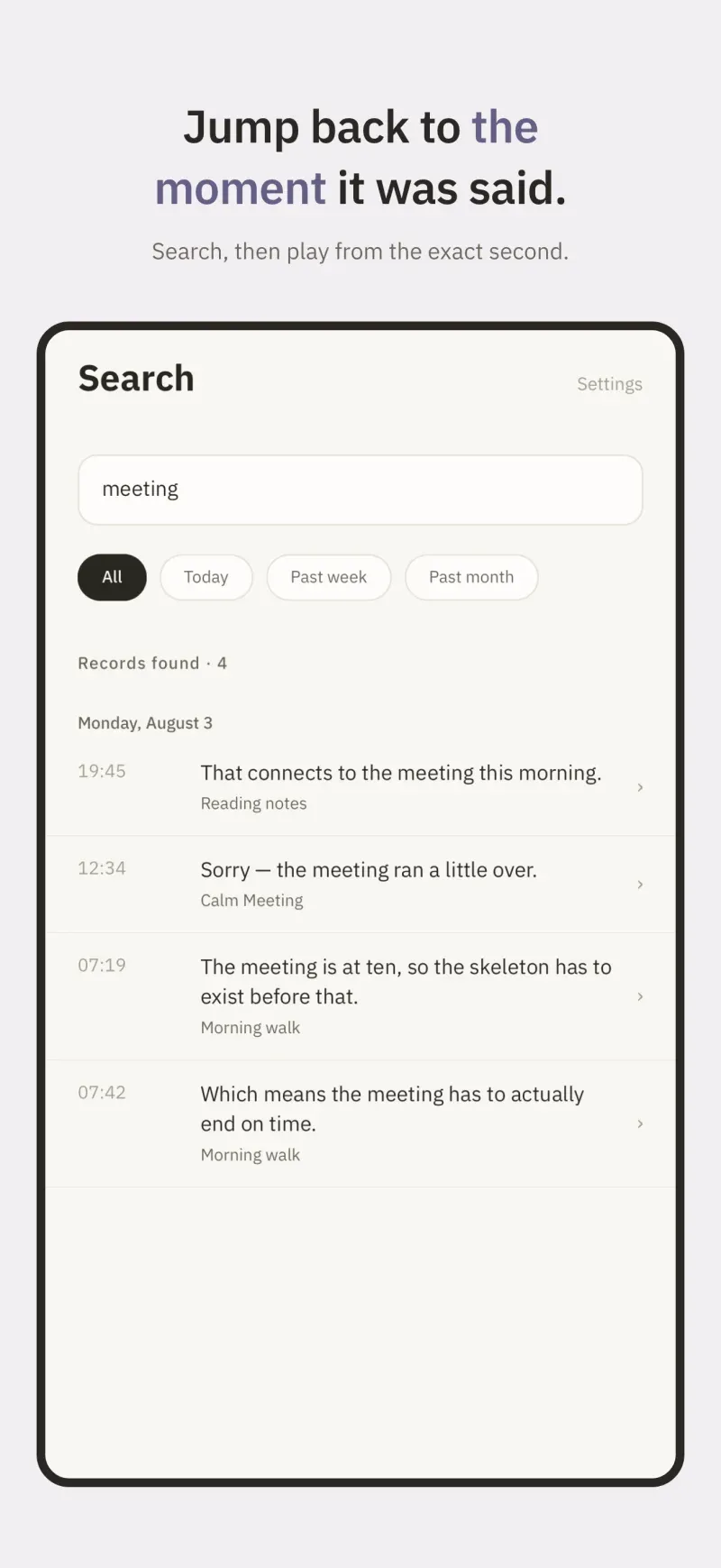
Search by word and go straight back to the moment it was said. -
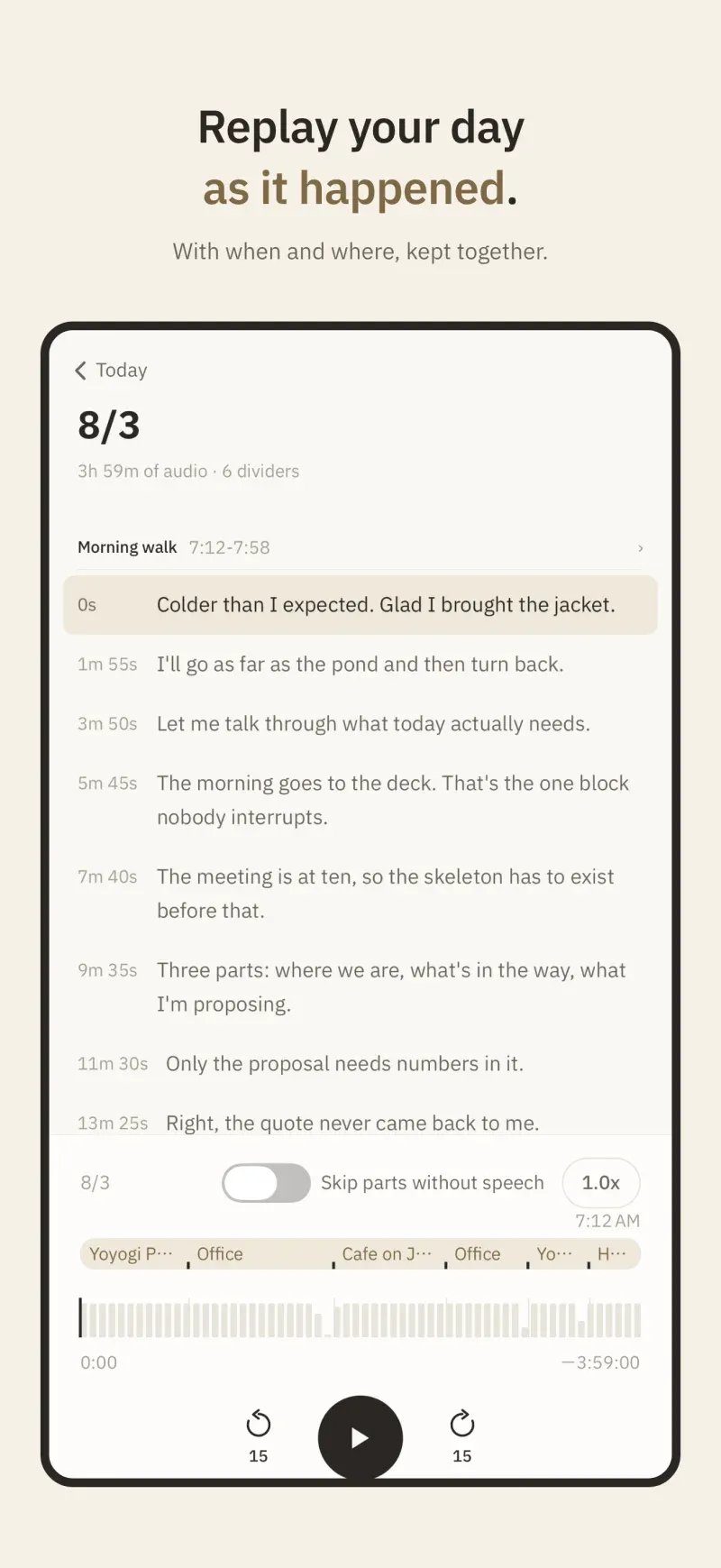
The day player replays morning to night in one piece. -
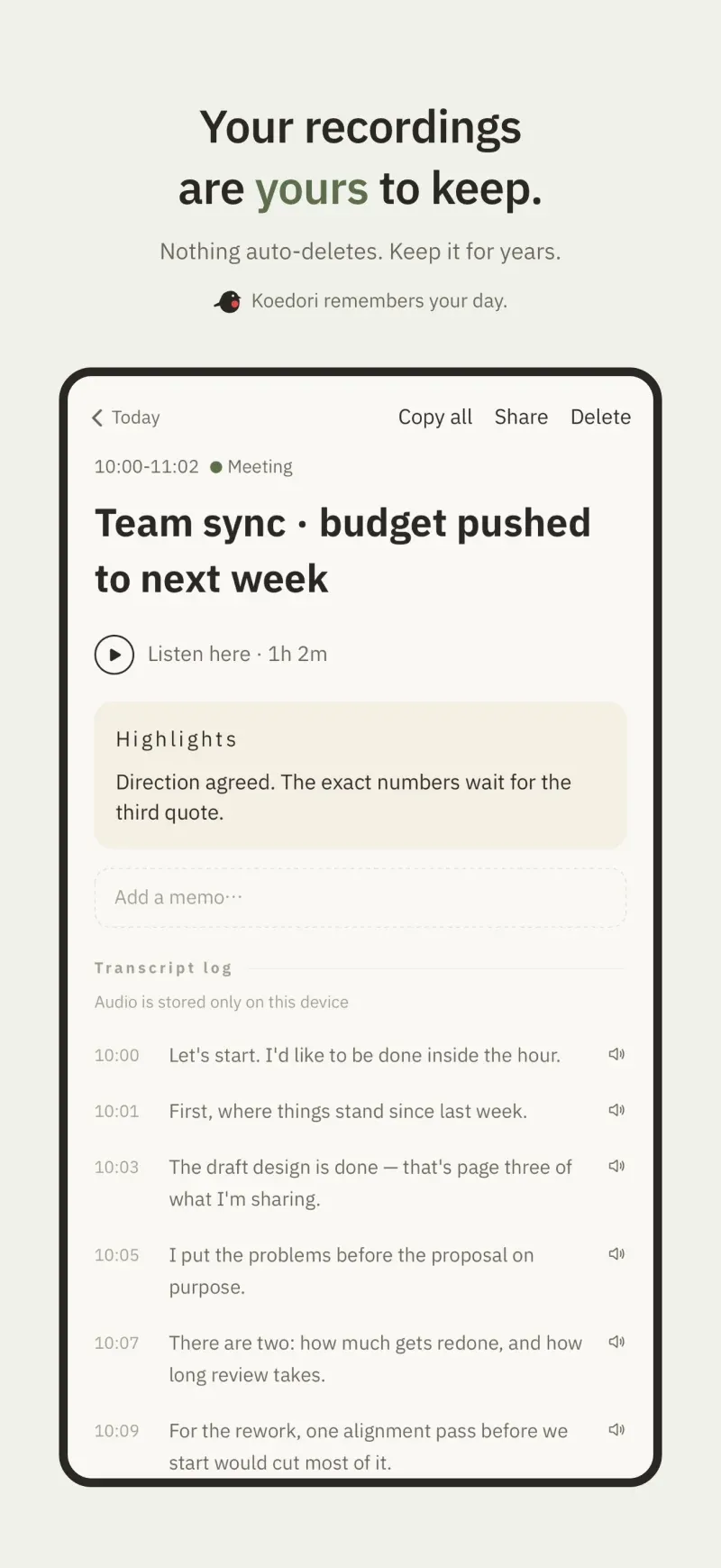
Your records are yours. Audio, transcripts and summaries delete at any time.
Frequently asked questions
- Is Koedori free?
- Everything that finishes inside this iPhone — recording, transcription, titles and summaries, search, the day player, minutes — is free. There is no account. Only the cloud features are Koedori Plus, an optional subscription. Exporting to Markdown, SRT or PDF is also free and runs on the device.
- What does Koedori Plus do?
- It is an optional subscription containing only cloud features: re-polishing a meeting or interview transcript (within a monthly allowance), rebuilding minutes and summaries, and device-encrypted audio backup so you can free space and fetch recordings back later. Processing is per recording; backup runs only after you turn that destination on. Recording and transcription still run on this iPhone. New subscriptions start with a free trial. The price is on the App Store product page.
- Can I use it for meeting minutes?
- Yes, for recording and transcribing meetings and interviews. Minutes can be built on the device itself, and the full transcript can be copied as a starting point. When a meeting deserves one more pass, the Koedori Plus cloud features — re-polishing, cloud minutes, formatted export — are available per recording.
- Where does the AI run?
- Transcription and the generation of titles and summaries all run with the iPhone's built-in speech recognition and on-device AI. By default, no audio and no text is sent to the cloud. Processing happens in the cloud only when you tap a Koedori Plus feature on a recording.
- Is my voice used to train AI?
- No. Regular transcription, titles, and summaries run on the iPhone. Only a recording you select for a Plus cloud feature is sent to outside AI services to perform the requested processing. Koedori does not use it for training, and the services it goes to are chosen from providers whose terms rule out training on the data they receive. Audio sent for processing is deleted from our side once processing finishes; text is deleted once this device confirms receipt.
- Where are my recordings stored?
- On this iPhone by default. With Koedori Plus, audio is backed up to the cloud only after you turn that destination on, and it is encrypted on your device first. The vault master key lives on your device and in iCloud Keychain; we do not hold it. We hold the per-record key only for a recording you ask us to process, only while processing, and delete it afterward. Audio sent only for processing is deleted from our side once processing finishes; text is deleted once this device confirms receipt. Each record's audio can be shared as an m4a file and its transcript can be copied in full.
- Do I have to record all day?
- No. One sentence or ten minutes on a walk is fine. You can pause from the Lock Screen, and if storage is a concern you can choose how long audio is kept.
- Which devices are supported?
- Transcription requires iPhone 12 or later (on iPhone 11 and iPhone SE 2nd generation, only recording, playback, the timeline and the day player are available). AI titles and summaries require an Apple Intelligence-capable device.
- Does it work with Siri?
- Yes. On iOS 27 / iPadOS 27 or later, on an Apple Intelligence device, in a language and region Apple supports, Siri AI can find your saved records and answer questions about what was said. It is off by default; when you turn it on in Koedori’s settings, only the titles, dates and transcripts of saved records go to Siri, never the audio. When you use Siri, your question and the record text it draws on may be processed in Apple’s cloud. It is free and does not need Koedori Plus. It is not a way to start or stop a recording by voice.
Keep today.
Leave recording on. Then just live the day.
A recording cannot be made after the fact.